|

As the world becomes one big marketplace, it becomes increasingly more important
to understand things as simple as time zones and business hours around the
world. One of the first
reviews I ever did was for a product called ActiveEarth by Logos Systems Research. They have since moved on to other software, but one
of the original programmers got the rights to the software and has updated
it. I recently had the opportunity to review ActiveEarth
2.0 by Norris Family
Industry.
Installation
I downloaded an installed the standard ActiveEarth
2.0 program. The setup
file is only 3 MB so it just took a minute to download on my cable connection.
The software is easy to install, with no substantial options (you can choose
the location to install, and whether everyone or "just me" can run the program).
Right at the end of the install process a window pops up that has some valuable
information. I had initially ignored the window, but upon installing it on
a second computer (to test the install process again), I noticed the window.
It explains that there are no standard menus in the program (you have to right-click
to see a menu), and that the program will access the Internet to check for
updates, and to sync up with an online time server. This last bit of information
is obviously to stop people from worrying that the software is spyware for
phoning home. Note that when I I cleared that final information, I did NOT
need to reboot.
Testing
I noticed two things right away. The shortcut that is on
the desktop is called "Shortcut to ActiveEarth 2.0". I'm sure that
is a mistake that will be fixed. Of course it doesn't affect the performance
of the program,
but it looks weird. The other thing I noticed was that the software seemed
to be sluggish on my computer (AMD processor,
1600MHz, 1GB RAM). The help section of the ActiveEarth
2.0 web site recommends that the software run on a Pentium
4 or above system (1.5 GHz or greater) with 256 MB RAM (512 recommended).
The software ran well enough, but I can certainly see how having a more powerful
system would allow the software to run much better.
  Other
than those two things, there was only one other thing that I noticed. You could
resize the window in weird ways. You could shrink the window so small that
you don't see what is supposed to be seen. I would think there should be some
limitations on how you resize the program. Other
than those two things, there was only one other thing that I noticed. You could
resize the window in weird ways. You could shrink the window so small that
you don't see what is supposed to be seen. I would think there should be some
limitations on how you resize the program.
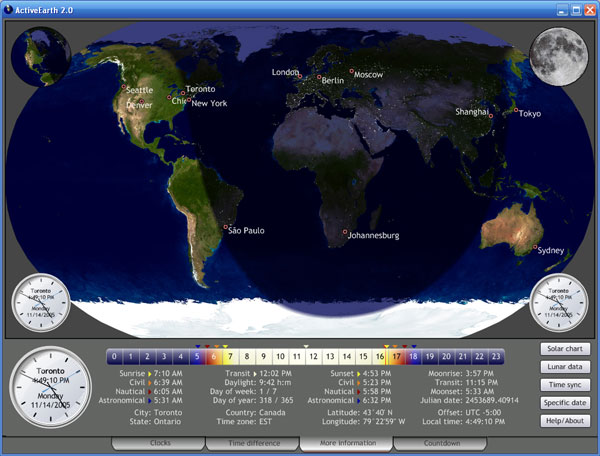
Other than that, the program is quite impressive and visually stunning. As
you can see by the main screenshot above, there are 4 tabs or sections to the
program. When you click on each tab, the main shot of the Earth stays the same,
and the information below it changes. You can choose to view the main shot
of the Earth in different ways (Robinson
Projection, LatLon Projection,
and Globe projection).
The first tab is called Clocks.
You can have numerous clocks showing the time in different cities around
the world. There are a lot of cities that are already available for you to
choose from. But you can put any city you want in if you know the latitude and longitude coordinates.
The second tab is called Time difference. This shows
a clock on the left and a clock on the right. In between is a similar time
"scale"
to the above screenshot (showing nighttime, sunrise, daytime, sunset) for
both cities, as well as a statement of the time difference and the distance
between
the cities.
The third tab is called More information. This is what is
shown in the main screenshot above. This is a fascinating screen that shows
all sorts of information
about the exact time of sunrise, sunset, different date formats, geographic
location, and more. This screen also gives you access to a bunch of other neat
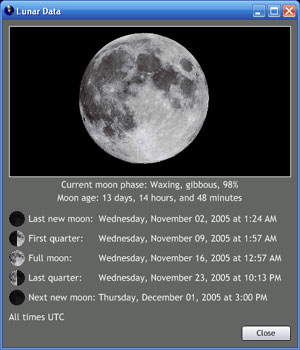
screens. The screenshot on the left shows the Lunar data window. It explains
the current moon phase, and when you can expect a full moon or a new moon.
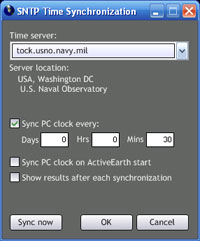
The screenshot on the right shows the Time sync window. You can choose from
a variety
of different
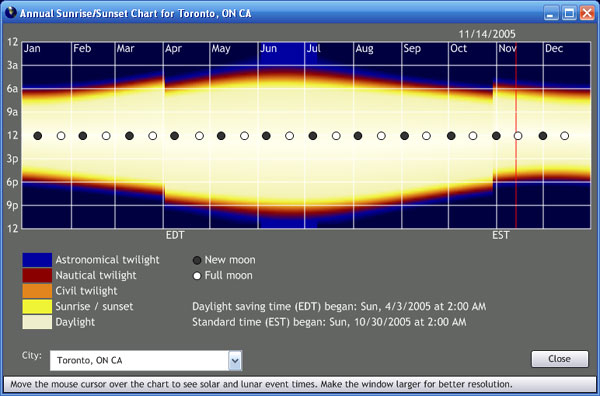
Internet-based time servers to keep your system clock current. The screenshot
below shows the Solar data window. It shows when during the year the sun is
out the longest. You can also tell by the "jumps" in the image where
the time changes occur. You can choose to view all of this same information
for a specific date.
The fourth tab is called Countdown. This tab shows clocks
that are counting down to a specific event. There are 4 preset clocks counting
down to when the seasons start. At first I thought there was a problem because
the second hands were moving backwards. It caught me off guard :-) You can
also add your own custom countdowns to events that matter to you (birthdays,
anniversaries,
etc).
Conclusions
My feelings about the program haven't really changed since the first time
I used it years ago. It is a beautiful program, with fantastic information.
But it is one of those programs that you either need or you don't. I just don't
have a need for such a program. But if you work on the road, or have family
or friends in other countries, then this could be very helpful. I can also
see how someone would be fascinated by all the extra detail that is now in
the program. This alone may convince come people to buy it.
You can download a 30-day evaluation version from the ActiveEarth
2.0 web site.
You can also download trials or read about their other programs, ActiveEarth
Desktop Clock or
ActiveEarth Clock Pack.
If you decide to purchase ActiveEarth 2, you may do so directly from the ActiveEarth
2.0 web site for $24.95.
If you owned a previous version of ActiveEarth, you are eligible for an upgrade.
Return to FreeHelp Software Reviews Home Page
Return to the FreeHelp Headquarters
Return to PCIN.net Home Page
|



