|

Handheld devices are more than just portable calendars. They are increasingly
becoming an entertainment platform. It's easy to transfer music to your handheld
device, but how do you get movies to it? Aren't they too big? Well, this is
what Makayama tries to overcome with DVD
to Pocket PC 3.0.
Installation
The software installs quickly and easily on your PC. This is not software
that installs on your Pocket PC device. During the install process, the Windows
Media Encoder 9 Series codecs are installed. This two-step process (installing DVD
to Pocket PC 3.0 and Windows
Media Encoder 9 Series codecs) only took a
minute on any of the 5 computers I tested the software on.
I was installing an upgrade to version 2, so the first time I ran it a window
popped up asking me to put in an activation code that had been sent to me.
After entering this code and continuing, the main screen came up and I could
start to use the software. I was never prompted again for that code. I'm a
little wary of activation on such a simple product. If I had purchased the
software, I would hope that I would be able to use it forever. If Makayama ever goes out of business or stops supporting the product, I should still
be able to use the product.
Testing
  The
biggest improvement in DVD
to Pocket PC 3.0 from its previous versions is that
there is a new mode called Cyberspeed. If a movie was 2 hours, it used to take
about 4 hours to have the movie ready to watch on your Pocket PC. Now, with
Cyberspeed, it takes only about an hour and a half. To use Cyberspeed,
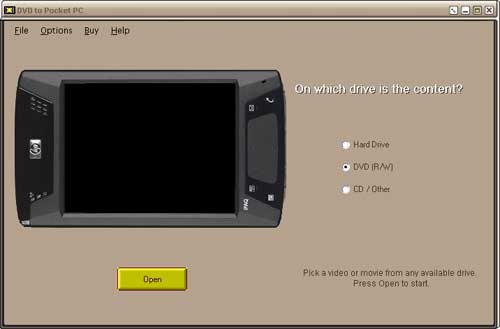
all you really have to do is let the software know where the DVD is (point
to your DVD drive, and start it). By default, Cyberspeed is turned on, and
the software will automatically choose the longest video on the DVD. If a DVD
comes with extra features, these are usually shorter, so picking the longest
one by default is almost always correct. The
biggest improvement in DVD
to Pocket PC 3.0 from its previous versions is that
there is a new mode called Cyberspeed. If a movie was 2 hours, it used to take
about 4 hours to have the movie ready to watch on your Pocket PC. Now, with
Cyberspeed, it takes only about an hour and a half. To use Cyberspeed,
all you really have to do is let the software know where the DVD is (point
to your DVD drive, and start it). By default, Cyberspeed is turned on, and
the software will automatically choose the longest video on the DVD. If a DVD
comes with extra features, these are usually shorter, so picking the longest
one by default is almost always correct.
The software is skinable. There are a lot of built in replacement colour schemes,
and more can be downloaded from the Makayama web site.
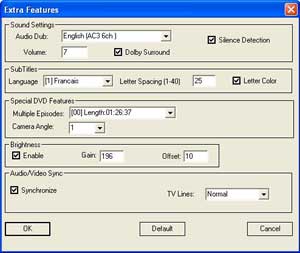
If you so choose, with Cyberspeed still on, you can walk through a couple
of options. You can choose what language the audio is in, choose how the video
should be (same as original, cropped so it fits on the screen better, or corrected)
as well as change the audio/video level. Obviously the higher you set this
to, the larger the file size. During my testing I left these levels at the
default.
I tried the software with Jurassic Park .
The volume label for the DVD was JURASSIC43, and once the software was done,
the name of the movie that was created on my desktop was JURASSIC43.WMV.
This is an improvement over the last version where the movie was called MYMOVIE.WMV. .
The volume label for the DVD was JURASSIC43, and once the software was done,
the name of the movie that was created on my desktop was JURASSIC43.WMV.
This is an improvement over the last version where the movie was called MYMOVIE.WMV.
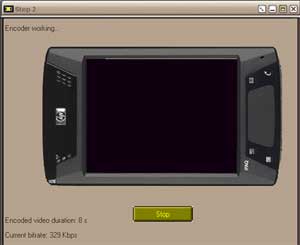
While using the software, I ran into a number of problems. The software would
appear to get through Step 1 (extracting the movie to your hard drive) without
any issues, but then when it goes into Step 2 (see the image on the right where
it is encoded
so the file is smaller), it would only end up encoding a portion of the movie.
When the software was done with Jurassic Park, I started the movie to see
how long it was. Windows Media Player reported that the movie was 1:31 long.
I checked the DVD, and the movie was supposed to be 2:01 long. No errors were
given at any point during the ripping or encoding. I tried this a couple more
times, but it still didn't work.
I tried the same thing with Star Wars , and it ended up being 1:53 instead of
2:04. The DVD is almost brand new, and as far as I can tell, there is not
a scratch on it. , and it ended up being 1:53 instead of
2:04. The DVD is almost brand new, and as far as I can tell, there is not
a scratch on it.
I tried the same thing with The Saint , and it ended up only 5 minutes long
instead of 1 hour 58 minutes. Again, the DVD appeared clean and scratch-free. , and it ended up only 5 minutes long
instead of 1 hour 58 minutes. Again, the DVD appeared clean and scratch-free.
The only movie that I was able to get to work was a DVD copy of the IMAX movie,
Niagara - Miracles, Myths & Magic . However, it combined the movie and the
behind-the-scenes feature. This could have been a result of the way the DVD
was made though. . However, it combined the movie and the
behind-the-scenes feature. This could have been a result of the way the DVD
was made though.
On How the Grinch Stole Christmas , I tried to turn Cyberspeed off so I could
see some of the extra features. It kept crashing on me though. I found out
later that if a movie doesn't have subtitles, then you can't turn Cyberspeed
off. The program should tell you this and let you choose a different movie
rather than crashing. , I tried to turn Cyberspeed off so I could
see some of the extra features. It kept crashing on me though. I found out
later that if a movie doesn't have subtitles, then you can't turn Cyberspeed
off. The program should tell you this and let you choose a different movie
rather than crashing.
The frustrating part is that all of these movies play perfectly both on a
PC and on a home DVD player. The fact that there were problems when using the
software makes me believe the problem is with the software, not the DVDs.
Conclusions
The concept behind the software is great, but unfortunately I just ran into
too many problems running DVD
to Pocket PC 3.0 to enjoy it. I emailed Makayama for support, but
since they are located in Amsterdam I wouldn't hear back from them until the
middle
of the night, and by the time I had a chance to try what they suggested, it
was
the middle of the night where they are.
I tried numerous times on numerous computers with numerous DVDs to get this
to work, and I just kept having problems with the software. When it worked,
it was exactly what I expected and exactly what I wanted. I recognize that
the problems could have been with my computers, or my DVDs, but since I tried
so many different combinations, I find this hard to believe. I would definitely
recommend that you try the 30-day trial to see how it works for you before
you purchase it.
DVD to
Pocket PC 3.0 is a free upgrade to users of version 2.5. There is a
small upgrade price of $11.95 for those who own version 2 or lower. The full
version is $32.95.
Return to FreeHelp Software Reviews Home Page
Return to the FreeHelp Headquarters
Return to PCIN.net Home Page
|



