|

The latest version of Adobe's Photoshop line of photo editors, Photoshop Elements 4.0 incorporates all the easy to use features of Photoshop Elements 3.0 plus a host of many new features. Magic Extractor, automatic red eye reduction and skin tone colour correction are just a few of the features that make this new release an ideal editor for both amateurs and serious hobbyists alike.
As with Elements 3.0, Elements 4.0 shares a similar interface and tool set
to the full version of Photoshop, currently Photoshop
CS2. Along with many of the same features, Elements 4.0 also has some additional
features not found in CS2. Photoshop Elements 4.0 is really two programs in
one. A photo editor and a photo organizer. The editor portion provides all
the tools you will need to edit your photos including colour correction, cropping,
lighting modification, sharpening and selective processing. The editing tools
supplied in this low cost editor are outstanding. The organizer also has a
great feature set, including the ability to tag photos for easy searching in
a variety of ways, facial recognition to aid in tagging the photos, multiple
catalog ability and grouping photos in version sets.
Photoshop Elements 4.0 Editor
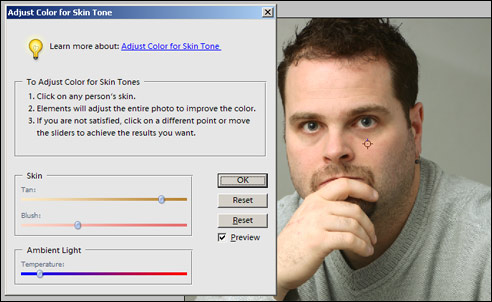 The editor has changed very little since version 3.0. Some of the changes include skin tone colour correction, magic extractor, magic selector, and smart blur. The spot healing brush is an excellent tool for removing unwanted elements from your photos including dust and minor scratches. The editor has changed very little since version 3.0. Some of the changes include skin tone colour correction, magic extractor, magic selector, and smart blur. The spot healing brush is an excellent tool for removing unwanted elements from your photos including dust and minor scratches.
 The
new magic selector works very well at selecting elements from within your photo.
My testing showed the tool is very easy to work with and fairly accurate. Using
this tool made it easy for me to colorize make a selection for selective colourizing,
or to cut and paste into another document, as well as touching up only a specific
area of a photo. The magic extractor, also a new tool, works well as creating
a selection to extract from the image. The
new magic selector works very well at selecting elements from within your photo.
My testing showed the tool is very easy to work with and fairly accurate. Using
this tool made it easy for me to colorize make a selection for selective colourizing,
or to cut and paste into another document, as well as touching up only a specific
area of a photo. The magic extractor, also a new tool, works well as creating
a selection to extract from the image.
Correcting for skin tone is very important as many digital cameras produce a slight cast to skin tones that can make a photograph look unrealistic. The software will automatically pick a recommending value for skin tone value, and you can then tweak the colour and tonality of the skin colour as well as the colour temperature to achieve the look you want.
As with version 3.0, there are many styles and effects that can be applied to your image, from layer and image styles to text effects. Photoshop compatible plugins may also be used increasing the number of effects you can do with your images. The addition of the Smart Blur filter provides the ability to smooth out noise in your image while still retaining detail.
Photoshop Elements 4.0 Organizer
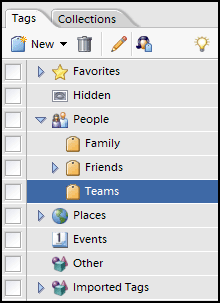 The Elements 4.0 Organizer provides functionality every photographer should take advantage of; tags. By tagging your photos with keywords, you can quickly identify photos of certain subject matter without having to look at a list of thumbnails, and without having to classify a photo by only one subject (or make duplicate copies). Elements 4.0 can apply multiple tags to a single image. A photo of a girl holding a flower may can be classified under flowers, people, and girls. and can be found using any one of those tags when searching. Tags can also be categorized; you can create a family category and individual tags for each of your children. Now if you only want photos of your daughter, simply search by that tag, or search by the family category for all images of your children. Collections of photos may also be created to organize photos by an event such as a particular trip or party. The Elements 4.0 Organizer provides functionality every photographer should take advantage of; tags. By tagging your photos with keywords, you can quickly identify photos of certain subject matter without having to look at a list of thumbnails, and without having to classify a photo by only one subject (or make duplicate copies). Elements 4.0 can apply multiple tags to a single image. A photo of a girl holding a flower may can be classified under flowers, people, and girls. and can be found using any one of those tags when searching. Tags can also be categorized; you can create a family category and individual tags for each of your children. Now if you only want photos of your daughter, simply search by that tag, or search by the family category for all images of your children. Collections of photos may also be created to organize photos by an event such as a particular trip or party.
Elements 4.0 Organizer also features a utility that will scan your images for faces and pick out each individual face in a photo to help with tagging those images. A group shot of 10 people will show 10 images after using the Find Faces for Tagging utility making it easier to properly tag you images.
Searches can be performed in the organizer based on metadata, or even similarity within photos. Images within the organizer can be viewed in a wide range of sizes that are easily changed using a sliding scale.
Both the editor and the organizer can both read and open many RAW formats used in some digital SLR and prosumer camera's. The RAW conversion utility launches automatically when opening a raw file and with Elements 4.0, will apply automatic adjustments to to RAW file to give you the best image possible. My
testing showed that the automatic corrections seemed to overexpose the image through a combination of both exposure and brightness sliders causing the images to be a little flat
for my liking although I have a very critical eye for my photography. The automatic settings will provide good prints most of the time will little adjustment for most users.
Creations in Elements 4.0 are different items beyond a simple photograph that Elements 4.0 can help you produce including slide shows, video CD's, an HTML photo gallery, and calendars, you can also create scrapbook pages, bound calendars and bound photo books as well. The software can automatically connect to Adobe Photoshop Services to order printed calendars and photo books along with other items when using creations. Photo sharing is done directly through email or by posting images to a free Kodak Easyshare Gallery.
Images are automatically downloaded from your digital camera when using the Adobe downloader, and can automatically correct red eye at the same time.
Pricing
Adobe
Photoshop Elements 4.0 is a feature packed product offered for a low price. Retail price for Elements 4.0 is 99.99 US available through the Adobe Store and most local computer and photography stores but can be found online for as low as 69.99 US. There is also a $20 US rebate for those upgrading from a previous version with a mail in rebate, or instantly when purchased through the Adobe Store.
Conclusions
Adobe Photoshop Elements 4.0 has an incredible set of features that will be welcomed by any digital photo enthusiasts. Serious hobbyists will appreciate some of the more advanced features they have included such as the ability to use RAW images, smart blur, and the spot healing brush. Those less proficient will appreciate the auto tools, such as auto color auto levels. Combined with the cataloging and searching abilities of the organizer, as well as the possibilities for creations and sharing that are offered with the product, this is sure to be a hit. This is definitely a product that I would recommend to any digital photographer.
Return to FreeHelp Software
Reviews Home Page
Return to the FreeHelp Headquarters
Return to PCIN.net Home Page
|



