|

Since computers have first become available (and affordable) to the general
population, they have and will continue to become more reliable. Failures that
used to occur regularly seem more of a chance occurrance. However, increasing
MTBF, a statistic used
to gauge reliability of a product, does still not justify not having a proper
backup strategy.
Backup strategies may vary from the very complex using autoloaders and expensive
dedicated software to the very simple. One new product will help computer users
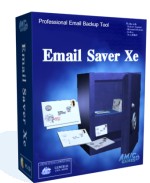
to back up their email data. Email
Saver Xe by Amic
Games will allow you to back up your email data and settings from any of
nine current email programs including Microsoft
Outlook and Outlook
Express, Eudora and Incredimail.

Installation
Installation of Email Saver Xe was very simple and only took a minute or so.
The installer is only 980 Kb so will not take long to download, even with a
dial up account. During the install, I was able to choose whether or not to
create Start Menu entry and a Desktop Icon for the software.
Testing
I am using Microsoft Office XP (running on Windows XP) and use Microsoft Outlook
for all of my email, both at home and at work where I access my email through
a Microsoft Exchange Server. When run, Email Saver Xe recognized which email
applications I had installed and provided them as available options for backup.
I was also able to backup my Internet Explorer Favorites. Email Saver Xe provides
the options of creating a single backup file, or splitting the file to fit onto
floppy disks, ZIP disks (100Mb or 250 Mb), or CDR (650Mb or 700Mb).
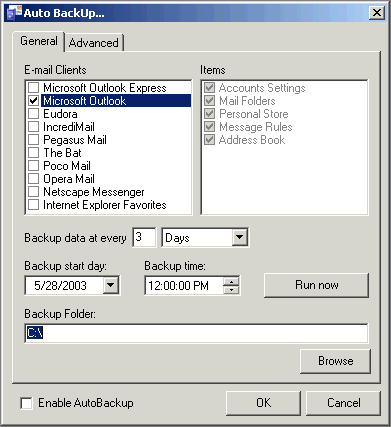
Scheduling a backup to run was also very simple. The wizard allows you to create
an Auto Backup Schedule. The schedule option will allow you to backup each of
your mail programs (you can only select one program while manually running the
software) as well as the Favorites. You can specify a backup interval, start
date and time, and frequency, file splitting options and the number of backup
files to keep. Security allows a password to be set on the backup file in both
manual and Auto Backup mode. Backup files are zip compressed automatically.
My backup files were approximately 56 Mb, while the uncompressed, live data
is approximately 84 MB.
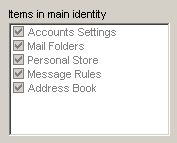
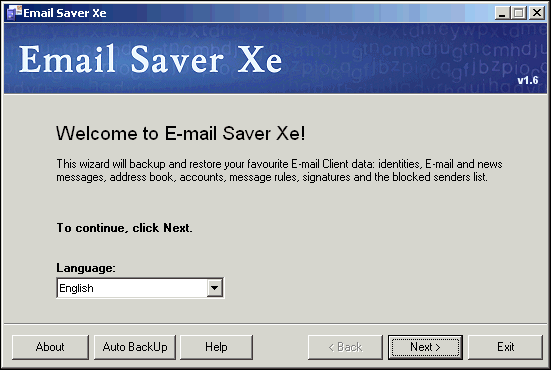
The backup files are created with an .ebk extension associated with Email Saver
Xe. To restore a backup, simply double click on the backup file and the wizard
walks you through the restore process. You are given the choice to restore directly
into the program, or into a separate location from where you can import the
data you require. If you restore to an alternate location, along with your data,
a .reg file is also created containing any of the registry settings for your
software.
I also tested the software in a corporate environment using a Microsoft Exchange
Server along with several .pst files. Email Saver Xe successfully backed up
my settings, rules, .nick and .fav files as well as an necessary registry entries.
As expected, it did not create an unnecessary backup of the data on the server
Purchase
A single license for Email Saver Xe sells for $29.95
while multi-user packs are available in quantities of 5, 10, 25 or 50 users
and savings of up to $17.99 per copy and may be purchased from Amic
Games.
Conclusions
Email Saver Xe was most useful to me when I rebuilt my computer. Using the
software I was confident that all of my data, settings and accounts were safe
and that I had not missed anything. I did not have to worry about recreating
my rules, importing my custom macro's or forgetting to back up one of my several
.pst files I use to organize my data. Passwords are not saved in the file and
therefore not restored which would be serious security concern.
I had a few issues with Email Saver Xe in the beginning of my testing. I was
unable to register the product, or exit properly although the actual process
of backing up and restoring my data worked flawlessly. This had been a problem
with the software not correctly reading my custom date format from the operating
system. My tickets to the support department were answered quickly and they
kept in informed of the changes they were making within the software to address
my concerns. Amic Games quickly developed a new release which resolved my issues.
This interaction with the company and their support department was very positive.
Email Saver Xe is affordable way to reliably backup email data which is becoming
more important. It does not substitute for a complete system backup but should
be part of your regular backup routine.
Return to FreeHelp Software
Reviews Home Page
Return to the FreeHelp Headquarters
Return to PCIN.net Home Page
|



