|
As programs and computers get more complicated, it has become
necessary to install some sort of utility to stop crashes,
resolve
conflicts, and fix Windows Registry settings. Symantec has Norton
Utilities; McAfee has Nuts & Bolts; Mijenix has Fit-It
Utilities. With their latest installment, Fit-It
Utilities 99 (hereafter referred to FIU99), Mijenix
(a subsidiary of Ontrack
Data International, Inc.) has come out with the best of the
bunch. On the inside flap of the boxed version, Mijenix claims
"unlike the others, it's lean, fast, and fully integrated."
I haven't agreed with a statement about a program so much in
a long time.
Fix-It Utilities has everything that you would expect in a system
utility suite:
- Defrag
- Disk Scanner
- Registry
- Full Hardware Testing
- Virus Checker
- Crash Protection
- Disk Cleaner
- and much more...
The whole thing is packaged together in a beautifully integrated
Control Panel. Everything is available from this one screen.
I'd like to focus on 3 features: the Defrag Plus program (found
under the Disks and Files menu), the Registry Cleaner (found under
the System Registry menu), and Crash Proof 99 (found under the
System Protection menu).
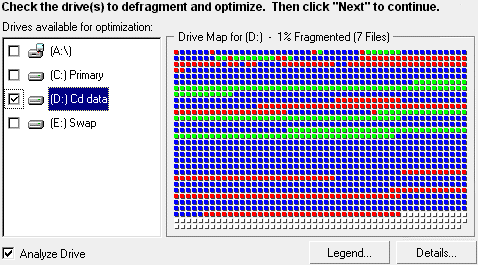
Defrag Plus is the disk defragmenter program that comes with
FIU99. It can read FAT, FAT32, and NTFS file systems and works
well with all of them. The defrag process is done in 2 parts.
The files themselves are defragmented (put in contiguous sectors),
and then the hard drive free space is consolidated (files at the
beginning of the drive, free space at the end). The consolidation
of the free space is what takes the longest, and by separating
the 2 processes, you can actually get back to using your computer
sooner. When the defragmenting is done, you can stop the consolidate
free space (or in the options choose not to run it at all), and
the hard drive is ready. You can also choose what priority level
you want DefragPlus to run. If you have it set at high, it will
finish faster, but you won't really be able to use your computer.
If you still need to use your computer can set the priority to
low, and although significantly longer, the defragmenting will
still get done eventually in the background.
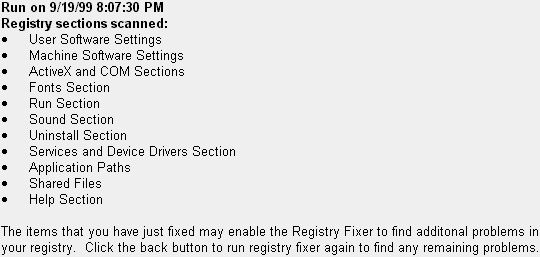
 The Registry tools with FIU99 are my favourite features. You
can clean the registry, fix erroneous entries, and defragment
it. The Fixer is the most notable. When you install programs,
they installation routine usually adds some entries to the registry.
When you uninstall that program, those entries should be removed.
Unfortunately, this doesn't always happen. You get left with orphan
entries, entries that exist, but don['t point to any files or
folders or point to the wrong files. Registry entries can also
point to other registry entries that don't exist any more. If
the registry has too many of these entries, you computer can slow
down, and in some extreme cases, can even crash. Therefore, it
is a good idea to fix the registry every once in a while as part
of your computer maintenance. All the major utility suites come
with a registry cleaner/fixer, but what is most interesting about
FIU99 is that when it is finished fixing the registry, it recommends
to go back as some of the fixes may result in more errors (removing
a registry entry may have result in orphaning another entry that
points to the now deleted entry). I had never thought of this
before, and sure enough, there were other things that could be
fixed. After running it 3 times, there were finally no more problems.
There may be other programs that prompt you to do this, but FIU99
is the first one I've used.
 With the pressure that companies are under to release new version
of their software, it is virtually impossible to keep your system
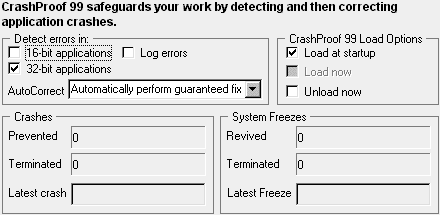
crash free. Crash protection programs try to stop crashes before
they happen. It had been my experience that when using Norton
CrashGuard, when you tried to unfreeze a program, I usually still
couldn't use it, and it also usually caused my whole system to
freeze up. I would then have to reboot my computer and anything
that was open in other applications would be lost. With the Crash
Protection built into FIU99, if this sort of thing will happen
(if the program has already reached the point of no return), then
you are told that you can't revive it. It doesn't even try. I
guess you may lose a little bit of data this way, but I have been
better off using FIU99 than other programs.
 Perhaps one of the most innovative features of Fix-It is that
it can be used on all platforms of 32-bit Windows; Windows 95,
Windows 98, and Windows NT. Most utility suites can't defrag a
NTFS drive, but Fix-It can. If you are multi-booting various operating
systems on one machine, this will save the cost of buying a FAT
defrag utility and a NTFS defrag utility.
The first thing you will notice when you install the program
is how fast the installation goes. It seemed to finish almost
instantly.
Once installed, the next thing you will notice is the excellent
interface. Everything is available from one screen.
The September 1999 issue of PC
Computing magazine tested the performance of the Norton SystemWorks
2000 McAfee Office 2000 And Mijenix Fit-It Utilities 99, and they
found that Norton SystemWorks made the system 18% slower, McAfee
Office 2000 slowed the system down by 17%, and Fix-It Utilities
99 only made the system 5% slower. This is the way a utility suite
should be, powerful enough to do everything, but sleek enough
to not know that it is there. FIU99 does this better than any
other program.
As an added bonus, when you buy Fix-It Utilities 99, you also
get PowerDesk Utilities 98 free. View my online review for it
at http://www.pcin.net/help/software/powerdesk.shtml.
You can buy
Fit-It Utilities 99 for $49.95 US if you are willing to download
it. It will cost you $49.95 US + S&H if you want the boxed
version.
After I first did this review, I had a newsletter subscriber
send me this email:
Graham -
Based on your recommendation I tried Mijenix/Fix-It Utilities.
The program is easy to install and use.  I am thoroughly
delighted with its use and functionality. I will not return to
Norton SystemWorks. Thanks for the advice!
Regards,
Leo Maldonado
Others have tried Fix-It Utilities and found it to be great.
You will too.
Return to FreeHelp Software
Reviews Home Page
Return to the FreeHelp Headquarters
Return to PCIN.net Home Page
|