|
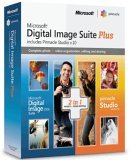
Microsoft Digital Image Suite Plus
Microsoft Digital Imaging Suite 2006 Plus is a collaboration between Microsoft and Pinnacle Systems. The product bundles Microsoft's digital image editing software with Pinnacle Systems video editing software to give you a complete digital editing suite for your still and motion pictures needs.
Microsoft Digital Image Suite
I really wasn't sure what to expect from this software not having used the Microsoft Digital Imaging Suite series before, my experience was really limited to Microsoft Photo Editor. This is by far much more advanced than Photo Editor and I was happy to see that. Microsoft Digital Image Suite is both a photo editor and a photo organizer (see my tip of the week from August 31, 2005 about organizing your images).
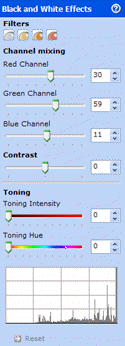 I was quickly impressed with some of the features of the image editor; channels support for more dramatic black and white images, curves, and RAW support for Canon and Nikon digital cameras. I was quickly impressed with some of the features of the image editor; channels support for more dramatic black and white images, curves, and RAW support for Canon and Nikon digital cameras.
Most software packages produce a very flat image when converting to black and white. Coming from a black and white background, the ability to create high quality black and white images is an important feature to me. Microsoft Digital Imaging Suite lets me use precise control of the 3 colour channels plus contrast, one of several methods I use to create black and white images in the digital darkroom, that rival those I created in my traditional darkroom.
 Intuitive Crop is a new feature that will automatically analyze an image and recommend an appropriate crop for that image. It is activated as soon as the crop tool is selected. Another nice feature is the overlay of Rule of Thirds guidelines to help proper compositional cropping. Curves control over 5 channels (red, green, blue, luminosity and saturation) also provides more advanced colour and tonal corrections. Intuitive Crop is a new feature that will automatically analyze an image and recommend an appropriate crop for that image. It is activated as soon as the crop tool is selected. Another nice feature is the overlay of Rule of Thirds guidelines to help proper compositional cropping. Curves control over 5 channels (red, green, blue, luminosity and saturation) also provides more advanced colour and tonal corrections.
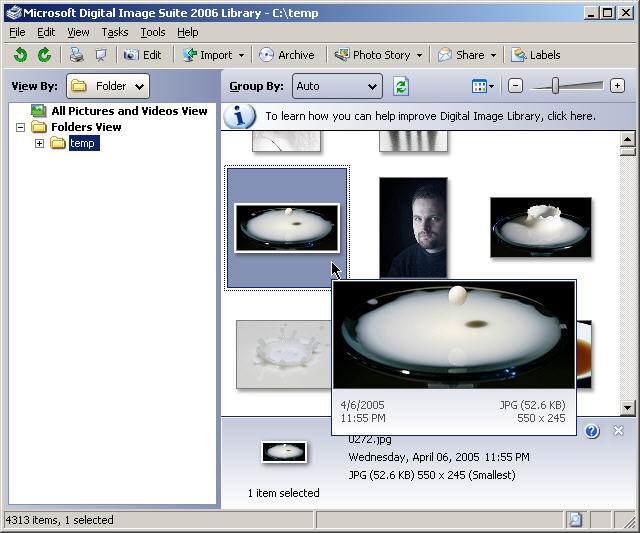
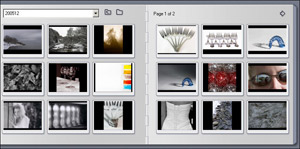
The other major component of Digital Image Suite is the Digital Image Suite Library. The library is a component that provides rating and tagging functionality to help organize your images. A few of the nice features of the library include a larger pop-up image when hovering over an image thumbnail and the ability to find other images in your collections that are similiar to the currently selected image (I had limited success with this feature). Microsoft has also incorporated Photo Story 3 into this product, though that is now available for download for free from the Microsoft site for anyone, not just users of Digital Image Suite. I liked that the email option for sharing images (there were only two options for sharing, email or to burn an sharing disc) allowed you to resize the images prior to sending to help keep image file size down.
Between the editor and the library, there are a host of great features in this package. Unfortunately, I found the interface on the editor to be generally unintuitive. Accessing some of the tools requires using the menus and their does not seem to be a toolbox to quickly move between tools and other than collapsing them, I could see no way do hide other palettes for tools I do not need access to all the time. Though I was happy to see RAW support in the package, it does not provide functionality to fully take advantage of RAW files, specifically adjusting exposure and colour temperature, nor does it support 16 bit images.
Pinnacle Studio 10
 Microsoft Digital Image Suite Plus also includes Studio 10 by Pinnacle for video editing. A full install of the software was 1.4 GB, and video captures will eat up a lot more space than that so be sure to have ample free space for this application. A 40 sec .avi file at 320x480 resolution was imported from capture at a size of 58 MB. Microsoft Digital Image Suite Plus also includes Studio 10 by Pinnacle for video editing. A full install of the software was 1.4 GB, and video captures will eat up a lot more space than that so be sure to have ample free space for this application. A 40 sec .avi file at 320x480 resolution was imported from capture at a size of 58 MB.
On my machine (AMD Athlon 2600+, 512MB Ram) Pinnacle Studio ran quite slow. That being said though, it still worked very well. The software was able to import video without dropping any frames (problems I have had with past video capture software) and the movies created were smooth as well with both audio and video, again problems I have experienced with other software.
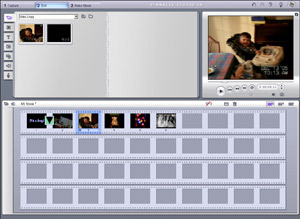
 The interface for Pinnacle Studio was very nice. it is broken up into three parts, a source window on the upper left, preview window upper right and movie window in the bottom of the screen. From the source window you can pick your video elements to use in your movie, including files to import, title slides or overlays, still images and transitions. The interface for Pinnacle Studio was very nice. it is broken up into three parts, a source window on the upper left, preview window upper right and movie window in the bottom of the screen. From the source window you can pick your video elements to use in your movie, including files to import, title slides or overlays, still images and transitions.
Some features in the software require an upgrade to use such as movement within a frame or certain effects and filters. The upgrade can be done from within Pinnacle Studio and cost $29.99 US. Studio 10 has many included transitions, several effects and more are available with the upgrade.
Pricing
Microsoft Digital Image Suite Plus is listed for $169.99 Cdn with additional rebates available for up to an additional $60.00 off. It is available from Amazon.com for $119.99 US with up to $30US in rebates. I recommend checking multiple sources to find the best price and read the fine print to make sure you qualify for the rebates.
Conclusions
Microsoft Digital Image Suite Plus has many excellent features, though the interface needs more work to make the software easier to use. There really does not seem to be any interaction between the two pieces of software other than a still image editor compliments a video editor. Pinnacle Studio is a very nice program to work with, and though it needs a lot of horsepower to run efficiently, still worked very well with my system.
Return to FreeHelp Software
Reviews Home Page
Return to the FreeHelp Headquarters
Return to PCIN.net Home Page
|



