|

Newsgator Techologies has released version 2 of their popular news aggregator
software. Newsgator can read RSS
and Atom feeds and integrates into Microsoft Outlook. Newsgator's basic features were
first featured on PCIN.net in our review of Newsgator 1.3;
since then, many new features have been added to the software.
The Newsgator software installs quickly and after you run Microsoft Outlook
the first time after installation, goes through an initialization process
and quick tutorial. During this process you pick or create your base folder
where Newsgator will store the feeds you subscribe to, which also serves as
the location for your Newspage. The initialization process also reviews the
default settings Newsgator installs with. Of course, these settings may be changed
at any time.
Due to it's tight integration with Microsoft Outlook, the Newsgator interface
is identical to Outlook. Folders appear inline with your Outlook folders. For
users using Outlook 2003, which provides functionality for grouping folder types,
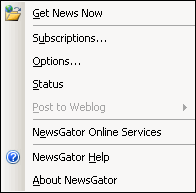
Newsgator folders appear within the mail folders group. A Newsgator toolbar
provides a button to force updates to your feeds as well as access to your subscriptions,
Newsgator options, the status window and the new Newsgator Online Services.

 As
with the original, Newsgator features a Newspage which is essentially a web
page produced by Newsgator, viewed in Microsoft Outlook, that allows you to
read your new feeds, or change your Newsgator options. I found this page very
useful for reading my feeds as it presents all of the feeds in a single view,
allowing me to quickly mark new items read, deleted or to create a post to my
own blog about the news item. I found I did not use the page as often in Outlook
2003 though. When used with the Unread Mail search folder and sorted by author,
I found the News Page to be a less efficient method of viewing feeds. This seemed
to be the most efficient way for me to read my feeds. As
with the original, Newsgator features a Newspage which is essentially a web
page produced by Newsgator, viewed in Microsoft Outlook, that allows you to
read your new feeds, or change your Newsgator options. I found this page very
useful for reading my feeds as it presents all of the feeds in a single view,
allowing me to quickly mark new items read, deleted or to create a post to my
own blog about the news item. I found I did not use the page as often in Outlook
2003 though. When used with the Unread Mail search folder and sorted by author,
I found the News Page to be a less efficient method of viewing feeds. This seemed
to be the most efficient way for me to read my feeds.
Newsgator 2.0 continues to provide the Subscribe in Newsgator option in Microsoft
Internet Explorer, and an extension has been written for Mozilla
Firefox to provide the same functionality. Feeds can also be subscribed
to from within Outlook or through Newsgator Online Services. Posting to Weblogs
is still supported, with a few more blog types now available to be posted to.
Reading and posting to NNTP servers is also still supported as in previous versions.
Newsgator Online Services
The most significant addition to Newsgator 2.0 has been the addition of the
Newsgator Online
Services. This is a premium service that provides many advantages over the
regular Newsgator installation. The online services allow you to maintain your
feeds on more than one computer. Newsgator licensing
does allow a second copy of Newsgator to be installed on a home machine when
the main license is installed on a business computer. Those computers are assigned
a machine ID that identifies them to the online services. OPML (a listing of
your subscribed feeds) files can be exported from Newsgator and imported into
Newsgator Online Services. OMPL files can also be made public through the Online
Services website for sharing. Feeds can then be read in one location only rather
than having to download feeds on all machines and having to sift through entries
you have already read. Feeds among machines may be shared by all machines and
can also be customized to permit feeds to be read in one location but not the
other.
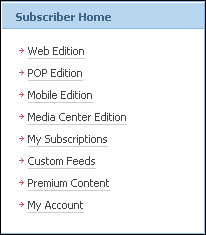
Subscription to Newsgator Online Services provides several alternate methods
of retrieving news items:
- Newsgator Web Edition: Read news items by visiting http://services.newsgator.com
- Newsgator POP Edition: Have news items delivered to your email program
- Newsgator Mobile Edition: Retrieve news items on your mobile HTML Enabled
device
- Newsgator
Media Center Edition: View feeds using Microsoft Windows XP Media Center
Edition 2004
Another advantage of subscribing to Newsgator Online Services is the ability
to create custom feeds. You can create custom feeds based on keywords or related
content. After entering your keywords or related content query into the appropriate
spot, Newsgator Online Services will create a custom feed for you that will
search the Internet for terms relating to your query. Subscription to Newsgator
Online Services also gives you access to many premium content subscriptions.
These feeds only available to Newsgator Online Services subscribers or they
have been licensed for use by subscribers.
Pricing
Newsgator
2. 0 can be purchased for $29. The pricing drops as more licenses are
purchased. Current owners of Newsgator can upgrade to Newsgator 2.0 for free.
Subscriptions to the online
services vary based on subscription package. All services include access
to Newsgator Web Edition, Newsgator Pop Edition, Newsgator Mobile Edition and
Newsgator Media Center Edition. Also included are a varying number of keyword
search feeds, related content feeds and premium content feeds.
Conclusions
Newsgator 2.0
is still one of the finest RSS aggregators available. It's tight integration
with Microsoft Outlook provides an easy, familiar and stable interface. The
Newsgator online services provide many additional enhancements that will be
very useful for some people. I especially appreciated being able to maintain
one OPML file and have Newsgator Online Services control where each feed can
be viewed. Synchronizing feeds between machines, and having access to your feeds
anywhere you have access to the Internet are both valuable features. Both Newsgator
2.0 and Newsgator Online Services offer free trials, although the prices for
the products are very modest.
Return to FreeHelp Software
Reviews Home Page
Return to the FreeHelp Headquarters
Return to PCIN.net Home Page
|



