|

Have you ever had a need or a desire to share documents with
other people, but you weren't sure they had same software as you
to view the document. Even if they do, the other person may not
have the same font to even display your document the way you intended.
This is where Adobe's
Portable Document Fomat (PDF) comes in. PDF has become the
standard format used to distribute documents without worry of
the other party not being able to open, view incorrectly, or print
the document. With PDF files, all of the text, fonts, formatting
and images you applied in creating your document are preserved
when converted to PDF. In order to view PDF files, you need the
free viewer available from Adobe at http://www.adobe.com/products/acrobat/readermain.html.

Up until recently, the only way to create PDF documents was to
use the software provided by Adobe, at a significant cost. Now
there is an alternative, pdf995.
Pdf995 allows you to print your document to a virtual printer
created during the install of pdf995. It is that simple. Using
the printer properties, you have some customization with the output
as you would with any printer, including paper orientation, whether
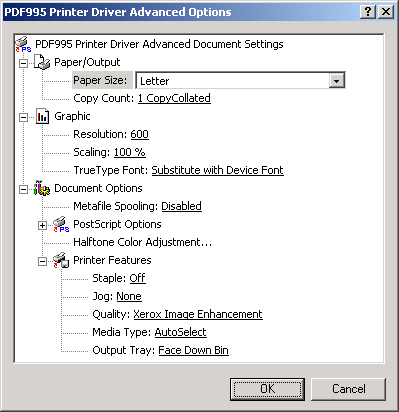
to print in colour or black and white, and resolution. The only
change I needed to make was how the vitual printer handled fonts.
By default, Subsitute with Device Font is selected for True Type
Fonts. I did run into an instance using an obscure font where
the virtual printer substitued another font for the one I had
picked. Changing this value to Download as SoftFont corrected
that, althought the default and recommened method is substitution.
There is more functionality than that though. An add-on product
is available for download as well. PdfEdit995
provides many more options for use with pdf995. With pdfEdit995
you may choose to automatically display the PDF file after creating,
have 3 options on how to save the files, have the ability to watermark
documents or apply a stationary to them, and the ability to set
up a batch of Microsoft Office files to print to the default printer
(which may be set to pdf995 if you require PDF output.) The biggest
feature I found though was the ability to combine documents.
PdfEdit995 has the option to add new documents to the last printed
document. You can now create a single PDF file from a series of
programs. I used it to create a report on web site usage that
came from 25 seperate web pages, each about 4 pages long. The
resulting PDF file was 104 pages in length. There was no problem
in creating this file, but I did notice the time to create the
file grew as I added more and more pages to the document.
One feature that is not included in the suite is the ability
to set security on the resulting PDF files. The PDF format allows
for security within the file to allow opening or changing the
document, printing, and copying from the document among other
things. This feature would be a great assest to people distributing
invoices, price lists and sensitive data using PDF files. Pdf995
has opted to use Microsoft Cryptographic technologies in their
product. This allows you to encrypt your files to 128-bit DES
encryption. The documentation states that you can encrypt and/or
sign PDF files, Micorosoft office files and ZIP files.
Conclusions
PDF files are an excellant way to distribute documents. The preservation
of formatting, text and images, plus the support Adobe has offered
for multiple platforms make PDF the easist way to let others view
your documents. For those who operate business using electronic
communication, it provides a great way to present invoices, order
forms and is widely used as a method of proofing graphic design
work.
All three products in the suite are freely downloadable from
http://www.pdf995.com
and are sponsered by advertising. Upon opening pdfEdit995, or
after printing to the viritual printer, a web page will open in
your default browser displaying a bit of advertising. For a very
nominal fee of $9.95 US per product, or $19.95 for the suite,
the advertising can be disabled.
Pdf995 easily creates PDF files and with the options gained by
pdfEdit995 and Signature995, the suite should not be avoided by
anyone needing to share documents with other people.
Return to FreeHelp Software
Reviews Home Page
Return to the FreeHelp Headquarters
Return to PCIN.net Home Page
|



