|


 PowerQuest
makes many software products, but their most popular with home
users is PartitionMagic. I've used the product since version 3,
and have always been impressed with it. I recently obtain a copy
of version
6.0 for review and was note disappointed with it. PowerQuest
makes many software products, but their most popular with home
users is PartitionMagic. I've used the product since version 3,
and have always been impressed with it. I recently obtain a copy
of version
6.0 for review and was note disappointed with it.
The installation was process was very easy. My test machine was
my Compaq Presario 1692 laptop. It has Windows 2000 SP2 installed,
a 6 GB hard drive, and 192 MB RAM. There were no warnings or errors
at all during the installation, and when complete, there was no
reboot needed.
One of the first things I do when I install a program is look
at the help options. I always try to do things myself first, but
when you can't figure it out, there isn't anything more important
than good manuals or online help. The PartitionMagic help is excellent.
Their online help is standard, but the electronic format of their
manual was excellent. The manual was available in PDF format.
I printed all 161 pages. There were also several other PDF documents
explaining:
- Basic Concepts
- Installing a Second OS
- Scripting Commands
When you start the program, the screen looks like this:
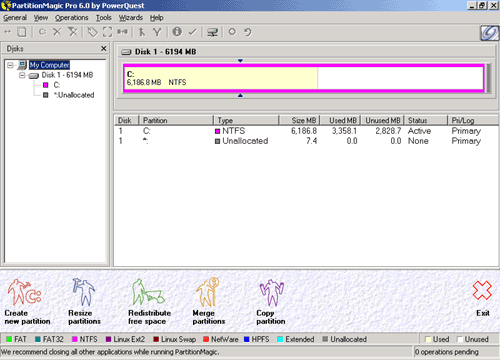
The screen shows you the hard drives installed in your system,
your partitions, their size and file type.
 Basic
Program Functionality Basic
Program Functionality
My first test was to resize the laptops 6 GB partition to 4 GB
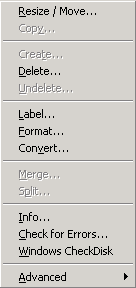
(with 2 GB unpartitioned). I right-clicked on the large partition,
and chose Resize/Move. I chose the new size, and clicked OK. You
are returned to the main screen again to make more changes. You
can choose to make several changes and then apply them all at
once.
I only wanted to do this one test, so I clicked apply. The computer
needed to do this outside of Windows, and so reboot into a "virtual
boot disk" called "PartitionMagic Boot-Time application
for Windows NT".
The entire process time can vary depending on the file system,
how big the drive is, and the speed of the drive. In this particular
case, it took approximately 30 minutes. This seems like a long
time, but I assume this is a reflection of my laptop, and not
the product. I have run the software on far less powerful systems,
and obtained faster results.
I rebooted into Windows, and started PartitionMagic again. The
next step was to create an extended partition, and then put a
logical partition in that extended partition. I right-clicked
on the unallocated space, and chose to make a Logical Parition.
The dialog box that appeared allowed you to choose several options,
and also informed me that "an extended partition will be
created to enclose this logical partition."
This process ended up needing 2 operations (one to create the
extended partition, another to create the logical partition).
When I clicked apply, the process started in Windows. Both operations
were completed in less than 8 minutes, all from within Windows.
None of the tests that I performed above required any help. The
program is very straightforward, and a user of almost any skill
level will be able to use the program without a problem. If the
user chooses, there are wizards that can walk them through the
various processes.
The program can also perform the following functions:
- Merge, Move, Resize, Format, Delete, Undelete, and Split Partitions
- Shred Partitions (when deleted)
- Convert file systems (from FAT16 - FAT32, FAT32 - NTFS, etc.)
Remote Agent
Remote Agent is a featuare that is only available in the Pro
version. This lets you boot another computer eith a floppy disk,
and remotely work the partitions on that computer.
I tried this with a desktop computer that uses a D-Link DFE-538TX
network card. From the PartitionMagic Start Menu group, I chose
the Boot Disk Builder. There were already some network cards that
I could choose from, but the 538 wasn't listed. I was able to
add the drivers, and then continue building the boot disk.
Upon completion, I rebooted my desktop, and it booted up in Caldera
DR-DOS, and started the Remote Agent. From the laptop, I clicked
the General menu in PartitionMagic, and connected to the desktop.
While using remote agent, you can copy and move partitions from
one computer to another. You cannot resize or move partitions
on the remote system (there is another set of boot disks that
you can do this locally).
This is obviously a feature for businesses. One use for this
would be to allow an administrator to copy a partition from one
machine to another without having to be physically at the computer.
I can't see this being a useful tool for a home user.
Conclusions
As I said at the beginning, previous versions of PartitionMagic
have been excellent, and this version is no exception. If you
ever have the need to do anything with your partitions for any
purpose (testing operating systems, organizing your hard drive,
etc.), then Partition Magic is well worth the $69.95
suggested price (of course you can always find
it cheaper). There are cheaper products (some even free) out
there, but none of them match up.
Return to FreeHelp Software
Reviews Home Page
Return to the FreeHelp Headquarters
Return to PCIN.net Home Page
|



